


Memorial Day 2026: Remote Solar Reliability Checklist | Tycon®
Memorial Day is first and foremost a time to remember and honor the men and women who died while serving in the United States military.
Memorial Day 2026 falls on Monday, May 25, creating a three-day weekend for many organizations. For companies operating remote cameras, communications equipment, industrial sensors, utility infrastructure, and other unattended systems, that also means some sites may operate for several days with fewer people available to respond if a power problem develops.
A holiday weekend does not fundamentally change how a solar system works. What it changes is the operational environment around it. A good pre-holiday check can help verify that solar generation, batteries, charge controllers, communications equipment, and backup power are ready to support the load while normal staffing is reduced.
Why Check Remote Power Before a Long Holiday Weekend?
Many remote installations are specifically designed to operate unattended. That does not mean they should be ignored before a period when technicians, facility staff, or contractors may be less readily available.
A pre-holiday inspection can help identify:
- A battery that is no longer reaching its expected charge level
- New shading or debris affecting the solar array
- A controller fault or warning
- Equipment that has recently increased the system load
- A communications link that is no longer reporting correctly
- Loose or damaged outdoor wiring
- A failed backup source
- A system that has adequate daytime power but insufficient overnight reserve
Verify the System Before People Leave
A holiday weekend is generally not the time to experiment with new charge settings, battery parameters, panel angles, or load-control programming. Confirm that the existing system is operating normally and investigate anything unusual before staffing is reduced.
1. Start With the Battery
Battery storage is what allows an off-grid solar system to continue operating after sunset and through periods when available solar energy is lower than the equipment load.
Before the holiday weekend, check the information available for the installed battery system, including:
- Battery voltage
- Charge status
- Recent low-voltage events
- Runtime compared with normal operation
- Physical condition where inspection is appropriate
- Temperature conditions expected at the site
A battery that reaches normal voltage but loses voltage rapidly under load may require more investigation. Battery condition should be evaluated according to the specific chemistry and manufacturer's requirements.
2. Check Solar Charging
Confirm that the solar array is actually replenishing the energy consumed by the equipment.
Look for:
- Normal PV voltage
- Charging current during useful sunlight
- Expected controller operating state
- No unexpected alarms or fault codes
- Panels free of significant obstruction
- Cabling and connectors in good physical condition
Do not assume that seeing voltage from the solar array proves the system is generating enough energy. Charging current, battery condition, load consumption, sunlight, and recent operating history provide a more complete picture.
3. Inspect the Solar Array Without Automatically Changing It
The original Memorial Day draft recommends adjusting solar-panel tilt for the holiday weekend. That is not a universal maintenance requirement.
If the system uses an adjustable mount and seasonal tilt changes are part of the established design, follow the applicable system documentation. Otherwise, changing the array angle simply because Memorial Day is approaching may create more risk than benefit.
Instead, inspect for practical problems such as:
- New vegetation or building shadows
- Heavy dirt or debris
- Loose mounting hardware
- Physical panel damage
- Damaged PV cable
- Anything that has changed since the system was commissioned
4. Confirm the Actual Equipment Load
Many reliability problems begin after the power system is installed.
A camera may be replaced with a higher-power model. A cellular router may be added. A radio may operate at a higher duty cycle. A heater or infrared illuminator may be enabled. A PoE switch may begin powering another device.
If the load has changed, the original solar and battery calculations may no longer represent the site.
The Tycon Systems® power and solar calculators can help compare the current equipment requirement with the power system supporting it.
A Complete Off-Grid System Has to Work as One Unit
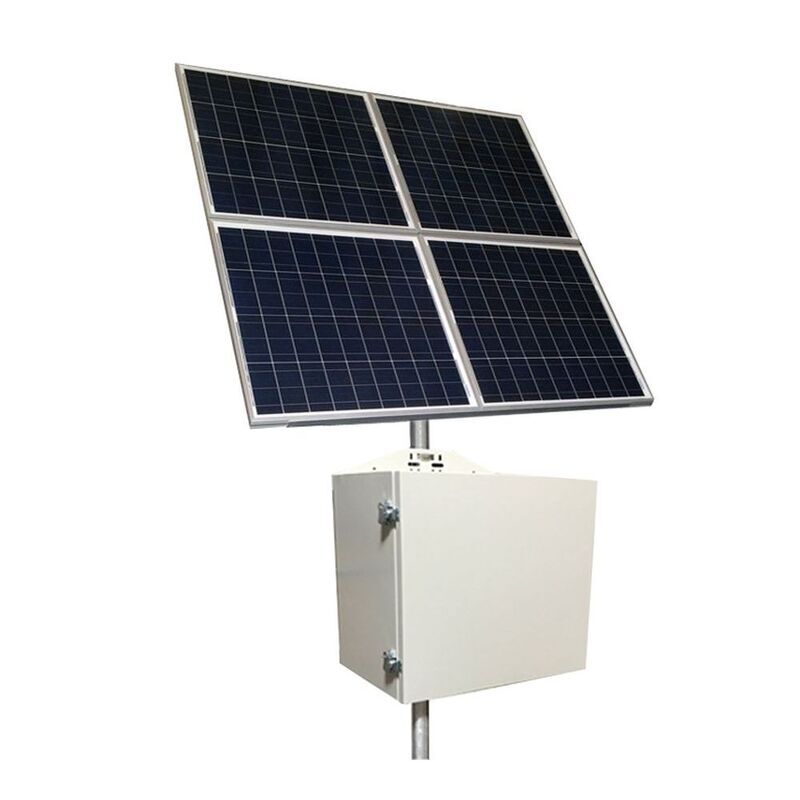
Solar reliability does not come from one component. The array, battery storage, charge controller, enclosure, wiring, protection devices, and connected load all affect whether the site continues operating when no one is there.
5. Verify the Charge Controller
The solar charge controller manages charging between the PV array and battery. Some models also provide load control, status displays, communications, and low-voltage disconnect functions.
Before the weekend, verify:
- The controller is charging normally
- No unexpected warning or fault condition is present
- Battery chemistry settings match the installed battery
- Load-control settings have not been unintentionally changed
- Communications are operating if monitoring is being used
MPPT and PWM controllers can both be appropriate depending on the system. A holiday weekend is not a reason to replace a properly matched PWM controller with MPPT simply because MPPT technology can provide advantages in other array configurations.
6. Confirm Remote Monitoring Before You Rely on It
Monitoring is especially useful during reduced staffing—but only if the monitoring path itself is working.
Verify that the system can still report the measurements or alarms you expect, such as:
- Battery voltage
- Current measurements
- Temperature
- Controller status
- Equipment state
- Remote alarms or notifications where configured
RemotePro® should not be described as the monitoring platform itself. Some RemotePro® systems use MPPT controllers with RS485 communications that can interface with compatible monitoring hardware.
Tycon® TPDIN® monitoring and control products provide remote measurement, I/O, relay control, alerts, and related capabilities for compatible installations.
A Dashboard Is Only Useful If the Communications Path Is Working
Verify monitoring, cellular service, network connectivity, email alerts, or other remote communications before the holiday begins rather than discovering a communications failure after an alarm should have been delivered.
7. Know Whether the Site Needs RemotePro® or UPSPro®
These two Tycon Solar® product families address different reliability problems.
RemotePro® is designed for sites where dependable grid power is not available and solar is the primary power source.
UPSPro® is primarily an outdoor UPS and battery-backup family for equipment that already has a normal AC, DC, or PoE power source but needs to keep operating if that power is interrupted.
If the concern heading into a holiday weekend is a utility outage at an otherwise powered site, review the current UPSPro® outdoor battery-backup systems .
8. Verify Backup Sources Instead of Assuming They Are Ready
Some critical sites use more than one energy source. Depending on the system, that might include utility power, solar, batteries, AC charging, a generator, or another supplemental source.
Redundancy can improve resilience, but simply owning a generator or having a second charging source does not guarantee uninterrupted operation.
If backup equipment is part of the design, verify:
- The backup source is actually operational
- Fuel is available where applicable
- Transfer or charging procedures are understood
- Required personnel know how the system is intended to operate
- Contact information is available if the site needs intervention
9. Do Not Assume Holiday Traffic Means Higher Electrical Load
A telecom, surveillance, or industrial site does not automatically consume more power simply because it is Memorial Day weekend.
Some communications networks may experience different usage patterns, while other industrial sites may reduce operations substantially. The important question for the solar system is whether the actual powered equipment changes its electrical demand.
Base system decisions on measured or documented load behavior rather than assuming every holiday produces a peak-power event.
10. Prepare for Fewer People, Not Just Different Weather
The biggest holiday-specific reliability issue may be staffing rather than sunlight.
Before the weekend begins, know:
- Who receives system alarms
- Who has remote access
- Who can physically reach the site if required
- What conditions actually require intervention
- Which loads are critical
- Where product documentation and support information are located
A Quick Memorial Day Reliability Checklist
1. Check battery voltage and recent runtime.
2. Confirm solar charging during daylight.
3. Inspect panels, wiring, connectors and mounting.
4. Confirm the current equipment load has not increased.
5. Review controller status and fault indications.
6. Verify remote monitoring and communications.
7. Test backup power where appropriate.
8. Confirm who will respond if the system reports a problem.
Remote Solar Reliability FAQs
When is Memorial Day 2026?
Memorial Day 2026 falls on Monday, May 25.
Can an off-grid solar system operate unattended over a holiday weekend?
Yes, when the system is properly sized and operating normally. Solar generation, battery capacity, equipment load, temperature, weather and desired autonomy all affect how long a system can operate without intervention.
Should I adjust my solar-panel tilt for Memorial Day?
Not simply because of the holiday. If seasonal tilt adjustment is part of the system design, follow the appropriate system or mounting guidance. Otherwise, focus on verifying that the existing array is unobstructed, secure and operating correctly.
Is MPPT required for a critical solar system?
No. MPPT can provide important advantages in many systems, particularly where PV voltage is substantially higher than battery voltage, but a properly designed PWM system can also provide reliable service. Controller selection should match the actual solar and battery architecture.
Does RemotePro® provide remote monitoring?
RemotePro® is an off-grid solar power system family. Some configurations include controllers with communications interfaces that can be connected to compatible monitoring hardware such as TPDIN® WEB3 or other supported adapters.
Is UPSPro® the battery system inside RemotePro®?
No. UPSPro® is a separate product family designed primarily for outdoor battery backup where normal AC, DC or PoE power already exists. RemotePro® is designed around primary off-grid solar operation.
Do remote sites always need generator backup?
No. Whether another charging source is needed depends on the load, solar resource, battery autonomy, required uptime and consequences of an outage. Some systems operate entirely from solar and battery storage, while others benefit from a hybrid architecture.
What should I do if my system is already showing low battery before a holiday?
Investigate before the holiday begins. Check solar charging, battery condition, connected load, controller status, wiring and recent weather. If the cause is unclear, use the product documentation or contact Tycon Systems® technical support rather than simply changing controller settings.
Check the System Before the Long Weekend
If a remote camera, radio, sensor, gateway or other field device needs dependable power while normal staffing is reduced, Tycon Systems® can help evaluate the load, battery runtime, solar capacity, backup power, monitoring and operating environment.
Visit the Support Portal → Request a System Design